eLearning Project Management – A Practical Playbook
The kickoff went great: everyone agreed on the goals, the stakeholders were excited and the launch date felt comfortable. Then the subject matter expert went on vacation, the legal review appeared from nowhere, and the third round of "small changes" rewrote half the script. Sound familiar? Most courses don't fail because the team lacks talent; they slip because nobody ran the project like a project, which is exactly the problem eLearning project management solves. What does a practical eLearning project management process look like from kickoff to launch?
Practical eLearning project management means breaking the course into clear phases (analysis, design, storyboard, alpha, beta and launch), putting a sign-off gate at the end of each one, and protecting the schedule by controlling who reviews what and when. The phases themselves are standard. What makes the difference is discipline at the gates: locking the script before narration, locking the storyboard before build, and limiting each review round to a set window and a single consolidated set of comments. Add a short risk list, a weekly status note and a named decision-maker, and most of the usual slips go away. The rest of this article is the playbook.
What Is eLearning Project Management?
eLearning project management is the work of planning, scheduling and steering a course from first request to launch, so it ships on time, on budget and actually teaches what it should. It borrows from general project management, which the Project Management Institute (PMI) describes as applying knowledge, skills and tools to meet project requirements. But eLearning has a few quirks that general playbooks miss.
The biggest quirk is dependency. Narration depends on a locked script, graphics depend on a locked storyboard, and programming depends on both. A change upstream doesn't just change one thing; it ripples through every downstream piece. The other quirk is reviewers: your subject matter experts (SMEs) and stakeholders aren't on your team, have day jobs and often see the course for the first time at review. Managing their time is half the job.
The Playbook, Phase by Phase
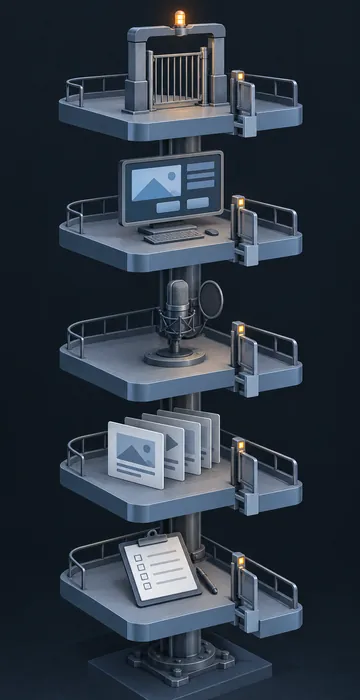
Each phase below ends with a gate: a specific deliverable and a named person who signs off on it. Nothing moves to the next phase without that sign-off.
1. Kickoff and Analysis
Kickoff is where you trade guesses for facts. Before the meeting ends, get answers to these questions:
- What should learners be able to do after the course that they can't do now?
- Who are the learners, and how will they take it (desk, phone, shop floor)?
- Who is the single decision-maker when reviewers disagree?
- Which SMEs will review, and how many hours can they give each week?
- Who else must approve it (legal, compliance, brand, IT)?
- Where will it run, and which tracking standard does the learning management system (LMS) need?
- What is the real deadline, and what happens if it moves?
Gate: a one-page project brief that answers all seven, signed by the sponsor. If nobody can answer the decision-maker question, stop and get that answer before you schedule anything else. Projects without a named tiebreaker drift from one review round to the next.
2. Design Document
The design document turns the brief into a plan for the course: objectives, outline, interaction types, assessment approach, look and feel, and length. Keep it short, because reviewers actually read short documents.
Gate: approved objectives and outline. This is the cheapest moment to change direction, so push reviewers hard to raise concerns now.
3. Script and Storyboard
This is where most of the content work happens and where most of the risk lives. The script and storyboard describe every screen, every line of narration, every interaction and every image. A well-built eLearning storyboard lets reviewers see the whole course before anyone builds it.
Gate: script and storyboard locked by the SME and the decision-maker. Narration is not recorded until this gate passes, and the standard is fully locked, not "mostly approved."
4. Alpha
The alpha is the first working build, with placeholder or scratch audio if needed. Reviewers check that the build matches the approved storyboard, that interactions work and that nothing is missing.
Gate: a consolidated comment list resolved and signed off. Comments that change approved content go through a change request, not a quick fix.
5. Beta
The beta is the near-final course with final audio, tested in the real LMS. This round is about polish and function, not content. Run full quality assurance (QA) here too: every screen, every device, every tracking scenario.
Gate: sign-off that the course is ready to launch, plus a clean test in the production LMS.
6. Launch and Close
Launch is not the end, so monitor completions and help-desk tickets for the first two weeks, correct anything urgent, then hold a short retrospective. Record what slipped and why, because that list is the most valuable document you'll produce for the next project.
How Long Should Each Phase Take?
Phase length depends on course size, interactivity and reviewer speed, so treat any schedule as a starting point. Here's an example schedule for a 30-minute, moderately interactive course with one SME and one approver who each give a few hours a week:
| Phase | Team work | Review window |
|---|---|---|
| Kickoff and analysis | 1 week | 2 days |
| Design document | 1 week | 3 days |
| Script and storyboard | 2 to 3 weeks | 1 week |
| Alpha build | 2 to 3 weeks | 1 week |
| Beta with final audio | 1 to 2 weeks | 3 to 5 days |
| Final fixes and launch | 3 to 5 days | 1 to 2 days |
Notice how much of the calendar is review time. On many projects, waiting for feedback takes as long as building. That's why the review windows are written into the schedule with dates, and why the schedule says what happens if a window is missed (usually, the launch date moves by the same amount).
Managing Reviewers Without Losing Friends
The single best habit in eLearning project management is one consolidated set of comments per review round. When five reviewers send five separate emails, you get contradictions, duplicates and a developer stuck in the middle.
Set these rules at kickoff and repeat them at every review:
- One shared review file or tool per round, with a clear due date.
- One person (usually the decision-maker) resolves conflicts before comments come back.
- Comments must say what to change, not just "this doesn't feel right."
- Late comments roll to the next round, unless they fix an error.
- New content after the storyboard lock is a change request with a cost and a date impact.
Be considerate about it, since SMEs are doing you a favor on top of their regular responsibilities. Short, focused review requests with exact questions ("Is the pressure limit on screen 14 correct?") get faster and better answers than "please review the attached."
How Should You Handle Change Requests?
Handle change requests with a short, written process that shows the cost of each change before anyone approves it. The goal isn't to say no; it's to make sure everyone sees the trade-off before they approve a change.
A change request only needs a few fields:
- What is changing, and which screens or files it touches.
- Why it's needed (error, new policy, preference).
- Estimated hours, broken out by script, audio, graphics, build and retest.
- Impact on the launch date.
- Approval from the decision-maker.
Sort requests into three categories. Errors and compliance changes always get corrected. Real improvements get weighed against the date. Preferences ("could the button be green?") get parked for a later version unless they're nearly free. Once stakeholders see that a "quick wording tweak" after narration means a re-record, re-sync and retest, many of those tweaks quietly disappear.
What Tools Do You Need to Run an eLearning Project?
You need fewer tools than vendors suggest. Most eLearning projects run fine on four things: a schedule, a shared review method, a tracker for issues and a single home for files.
The schedule can be a spreadsheet or a project tool, as long as it shows phases, gates and review windows with real dates. Reviews work best in a tool that lets people comment directly on screens, whether that's a review feature in your authoring software or a shared document for script rounds. The issue tracker can be a simple sheet with columns for screen, problem, owner, status and round. Files belong in one shared folder with a clear naming rule and a single "current" version of each source file.
Pick tools your reviewers can open without training. A beautiful system nobody outside the team can use just pushes feedback back into email, which is where projects go to get lost.
What Are the Biggest Risks in an eLearning Project?
The biggest risks are late or missing SME input, scope creep after the storyboard, surprise approvers, technical problems in the LMS and unclear decision rights. Almost every slip I've seen traces back to one of these five. Keep a simple risk list with an owner and a plan for each:
- SME availability: book review time on their calendar at kickoff, and name a backup SME.
- Scope creep: lock the storyboard and route every new idea through a change request.
- Surprise approvers: ask "who else needs to see this?" at kickoff and again at the design gate.
- LMS problems: test a sample package in the real LMS during the alpha, not the week before launch.
- Decision rights: name one decision-maker, in writing, before any reviews start.
Review the list every week, because a risk you discuss early is usually one you can resolve cheaply.
Status Updates People Actually Read
A good status update fits on one screen and answers three questions: are we on track, what's happening this week, and what do I need from you. Send it on the same day every week so stakeholders learn to expect it.
A simple format works: a one-line status (on track, at risk or late), the current phase and next gate date, this week's work, decisions or input needed with due dates, and any risk that changed. Skip the long narrative, and if something is at risk, say so plainly and explain what you're doing about it. Bad news delivered early is a planning problem, while bad news delivered late is a trust problem.
Run Your Next Course Like a Project, Not a Favor
eLearning project management comes down to clear phases, hard gates, controlled reviews and honest communication. The phases keep work in the right order, the gates prevent expensive rework, and the review rules protect your SMEs' time and your schedule.
Before your next status meeting, take your current project and do three things: write the one-page brief if it doesn't exist, name the decision-maker, and put dated review windows on the calendar. Those three moves alone will prevent most of the slips you've lived through before.