Why 3D Animation Works for Technical Training

Some things in technical training are simply impossible to film, such as the inside of a running pump, the way pressure moves through a hydraulic line or the split second when a bearing starts to fail. You can describe them, sketch them or point at a diagram, and learners will still squint. Why does 3D animation for training explain these moments so much better than words, photos or video?
3D animation works for technical training because it shows learners exactly what they need to see, including things no camera can capture, from the clearest angle and at the right speed. It can reveal hidden parts, slow down fast events, strip away clutter and safely show failures that would be dangerous to stage. That control reduces the mental effort of decoding what's on screen, leaving more attention for understanding how the equipment works. It also travels well across languages and stays consistent across every class and site. Live video is still better for some tasks, but for complex machines and invisible processes, 3D animation is hard to beat.
How Does 3D Animation Show What Cameras Can't?
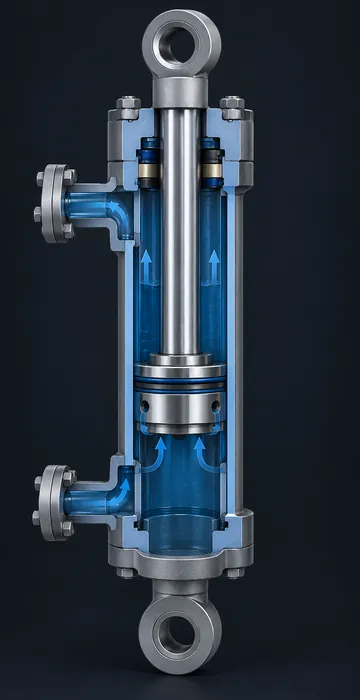
The biggest reason 3D animation for training works is simple: it can show the inside of things. A camera sees only the outside of a valve, while an animation can slice the valve in half, color the fluid and show the gate sliding down to cut off flow. The learner finally sees the mechanism the manual has been describing.
The same goes for invisible processes: electrical current, heat transfer, gas dispersion and pressure waves don't show up on video, but in 3D they can become glowing paths, color gradients or moving particles. Once a learner has seen pressure build behind a closed valve, the warning in the procedure stops being an abstract rule.
Why Does Controlling Time and Viewpoint Help Learners?
Real events happen at their own speed and from wherever the camera happened to be positioned, whereas animation lets you choose both the timing and the viewpoint.
- Slow down events that happen too fast to follow, like a relief valve lifting.
- Speed up slow processes, like corrosion or wear over months.
- Pause at the important moment and rotate around it.
- Move the camera to places no person could stand, such as inside a tank or under a moving part.
- Explode an assembly along one axis to show how parts stack together, then bring it back.
I think of this as directing the learner's eyes. In a real workshop there's too much to look at, but in a well-planned animation there's exactly one thing to look at in each moment, and the camera takes you straight to it.
Why Does 3D Animation Reduce Mental Effort?
Because it removes the work of decoding. When learners look at a cluttered photo or a busy schematic, a lot of their mental energy goes into figuring out what they're looking at. Learning researchers call that extra effort extraneous cognitive load, and it competes with the effort of understanding the content.
Richard Mayer's research on multimedia learning offers practical principles that fit animation especially well. The NUS Medicine summary of Mayer's 12 principles of multimedia instruction is a handy reference. A few that matter most for animation:
- Signaling: highlight the part that matters right now, and fade the rest.
- Segmenting: break a long process into short, learner-paced chunks.
- Modality: explain with narration, not with blocks of on-screen text competing with the motion.
- Coherence: leave out decorative detail that doesn't serve the explanation.
3D animation makes all four principles easy to apply, because you can tint the active part, dim the housing, pause between stages and keep the scene free of anything that doesn't belong.
Where Does 3D Animation for Training Beat Other Formats?
Every format has its place, and here's how I think about the main options for technical content.
| Format | Strongest when | Weakest when |
|---|---|---|
| Live video | Showing real hands, real tools and real sounds on visible tasks | The action is hidden, dangerous, rare or cluttered |
| 2D animation and diagrams | Explaining flows, systems and concepts simply | Learners need to understand depth, position or assembly |
| 3D animation | Showing internals, spatial relationships, sequences and failures | The skill is mostly about people, conversation or feel |
| Interactive 3D | Learners must practice the steps, not just watch | Budget or timeline is tight and watching is enough |
The last row is the one to remember, because animation shows while interaction lets learners practice. Many good programs start with animation to build understanding, then add interactive practice for the most important procedures.
What Other Advantages Does 3D Animation Give Training Teams?
Beyond the learning benefits, 3D animation for training solves some everyday problems for the teams who build it.
It Works Across Languages
An animation of a pump teardown means the same thing in any language, since you can swap the narration track and captions while the visual stays identical. That consistency makes it a strong choice for global workforces and multilingual crews.
It Shows Failures Safely
You can't film a pressure vessel rupturing for a training video, and you wouldn't want to. Animation can show the sequence of events clearly and respectfully, so learners understand why the controls exist.
It Stays Consistent and Reusable
Every learner sees the same explanation, regardless of which instructor or site they have. The 3D models can also be reused in other formats: still images for job aids, interactive viewers and even augmented or virtual reality later.
When Is 3D Animation the Wrong Choice?
It's the wrong choice when the thing to learn is already easy to see. If a task is visible, simple and done in a clean space, a well-shot video of an experienced person doing it is faster to make, cheaper and often more convincing. Learners trust real hands on real tools.
Animation also struggles with skills that depend on physical feel and sensory judgment. How tight is tight enough? What does a bearing sound like just before it fails? How much force does a stuck valve need? A model can hint at these, but real practice, real audio and a good mentor teach them better.
A few other warning signs:
- The equipment changes every few months, and nobody has budgeted to update the models.
- The audience needs to recognize their exact machine, worn paint and all, and a clean model looks too unfamiliar.
- The real need is a quick reference card, and a two-minute clip would just slow people down.
- Stakeholders want animation because it looks impressive, not because learners are confused.
That last one comes up frequently, because animation needs a specific understanding problem to solve. When it has one, it's among the most effective tools a technical training team has; when it doesn't, it's an expensive decoration.
How Do You Plan a 3D Animation Project?
Most projects follow a similar path, and the early steps matter most.
- Define the one thing each clip must explain. Keep clips short and focused.
- Write the narration script with a subject matter expert, and get it approved before modeling begins.
- Storyboard the camera moves and key frames. This is where you decide what's cut away, highlighted or slowed down.
- Gather reference: CAD files, photos, dimensions and maintenance manuals.
- Build an animatic, a rough version with simple shapes and timing, and review it with the expert.
- Produce final models, materials, lighting and renders.
- Add narration, captions and any on-screen labels, then test with learners.
Changes get more expensive with every step, so catch technical mistakes at the script and animatic stages. Moving a camera in a rough draft takes minutes, while re-rendering a finished sequence can take days.
If your project might grow from watching into doing, it's worth thinking about the engine side early. The decision of Unity vs Unreal for simulation affects how easily your animated models can become interactive practice later.
Seeing the Invisible Is the Whole Point
3D animation works for technical training because it gives learners a clear view of the things that matter most and are hardest to see: hidden parts, invisible forces, fast events and dangerous failures. It controls time, viewpoint and focus in ways that cut through clutter and make complex equipment understandable.
Look at your current technical courses and find the spot where learners always get confused. It's usually a place where they're asked to imagine something they can't see, and that's your first animation, and it's often the one that makes the rest of the course click.