Should You Update or Rebuild an Old eLearning Course?

The course still works, mostly, but the screens look dated, a few steps no longer match current practice and the quiz has that one question everybody misses. Someone has to decide whether to update or rebuild eLearning like this, and both options carry a real cost. Should you update or rebuild an old eLearning course?
Update the course when the need is still real, the source files are editable, the overall structure still fits the job and the changes touch only part of the content. Rebuild it when the format is obsolete, the source files are lost, the job or process has changed broadly or the design no longer helps people learn. A useful rule of thumb: if you would end up changing most of the screens anyway, rebuild. Either way, compare the cost over the next few years, not just this round of changes.
Update or Rebuild eLearning? Five Questions That Settle It
Run every borderline course through these questions, and write the answers down so the decision is easy to explain to stakeholders later.
- Does anyone still need it? If not, neither option. Retire it.
- Do you have editable source files in a tool your team can use today?
- How much of the content is wrong or outdated: a few screens or most of the course?
- Does it run on the devices learners actually use, including tablets and phones?
- Does the course design still fit the job, or has the work itself changed?
A "yes" on question two and "a few screens" on question three point strongly toward an update, while missing source files, an obsolete format or a changed job point toward a rebuild.
Signals at a Glance
| Signal | Points toward update | Points toward rebuild |
|---|---|---|
| Source files | Editable, in a supported tool | Lost, or only in a retired tool |
| Content changes | A few screens or a policy detail | The process, equipment or audience changed |
| Technology | Runs in current browsers and on tablets | Needs a plug-in or fixed old screen sizes |
| Accessibility | Small gaps, such as missing captions | Built without keyboard access or readable structure |
| Learner feedback | Generally positive, with specific complaints | People avoid it, rush it or call it useless |
When Is an Update the Smarter Move?
Update when the underlying structure is sound. A course that teaches the right things, in a sensible order, with decent practice, does not need to be discarded because a few screens are wrong, so correct the content, refresh anything that looks broken and move on.
Updates make particular sense for compliance and safety courses where a regulation or a site rule changed but the core procedure did not. They also make sense when the course is due for another revision soon, because there is little point rebuilding something you will have to revise again in six months.
Keep updates disciplined by documenting exactly what will change before anyone opens the file. Scope creep during an update is how a two-day correction becomes a three-week project with none of the benefits of a genuine rebuild.
When Does a Rebuild Pay Off?
Rebuild when patching would mean fighting the course on every screen. If the format requires a plug-in nobody supports, the source files are gone or the layout falls apart on a tablet, every future update will be slow and expensive, and a rebuild resets that.
A rebuild also makes sense when the job itself has changed. If the crew now uses new equipment, a new system or a new process, an old course with new screens dropped into it will feel stitched together, and learners notice. They lose trust in training that clearly wasn't designed for the way they work now.
The good news is that a rebuild is rarely a true start from scratch. You keep the objectives that still apply, the strongest scenarios, the quiz items that performed well and the SME knowledge built into the script, which makes a rebuild considerably faster than developing a brand-new course on the same topic.
Is There a Middle Ground?
Yes, and a middle path is often the right answer, since three in-between options come up regularly:
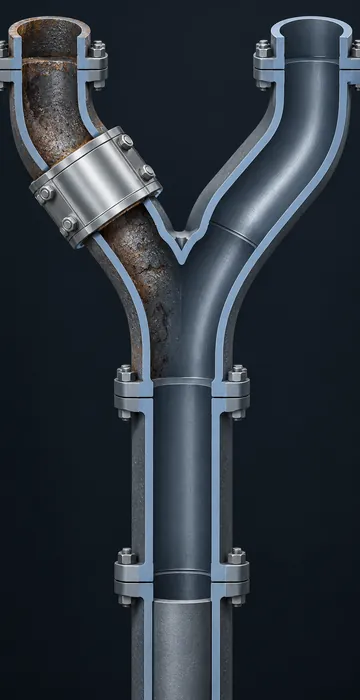
- Reskin: keep the content and structure but move it to a current template or layout so it looks modern and works on smaller screens.
- Partial rebuild: keep the modules that work and rebuild only the ones that are outdated.
- Split and trim: break a long course into shorter pieces, cut what nobody needs and update what remains.
These options work well when you have a limited budget and a long list of aging courses. They buy time on lower-priority titles so you can invest your real development budget where it matters most.
How Do You Compare the Costs Honestly?
Look past the first invoice. An update that costs less today but leaves you with difficult-to-edit files can cost more over a few years than a rebuild that is easy to maintain.
Here is a simple worked example with invented numbers. Say an update costs 40 hours now and each later revision in the old files costs 30 hours, while a rebuild costs 100 hours now and each later revision costs 10 hours in a modern tool. If you expect three revisions over the next few years, the update path and the rebuild path both total 130 hours. With four revisions the rebuild comes out ahead, and with one the update wins easily. Plug in your own numbers, because the point is to count the future edits, not just the next one.
Include the indirect costs as well. A course that doesn't function on the tablets your field staff carry creates workarounds, help desk calls and frustrated supervisors, and those costs are real even if they never appear in the training budget.
Who Should Make the Call?
The course owner and the training team should decide together, with input from the people who take the course. Owners know whether the content still matches the work, developers know what the files will and won't allow, and learners know whether the course actually helps them.
Don't skip that last group. A ten-minute conversation with two or three people who completed the course in the last few months tells you more than any spreadsheet. Ask what they remember, what confused them and whether they ever returned to it on the job, and if the answers are "nothing," "most of it" and "no," you have your decision too.
Supervisors are worth a call as well, because they see whether new employees arrive knowing what the course was supposed to teach. If they keep re-explaining the same procedure on the floor, the course isn't doing its job, regardless of what its completion numbers say.
What If Your Authoring Tool Forces the Question?
Sometimes the decision is made for you because the tool behind the course is going away or changing. When a vendor moves to a new product line, older projects may not open cleanly in the new version, and every update gets harder. If your courses were built in the older Adobe Captivate, planning a Captivate Classic migration is a good time to sort courses into update, rebuild and retire, rather than moving everything over as is.
For any rebuild, bake accessibility in from the start. It costs far less than retrofitting later, and the W3C's introduction to web accessibility is a good, plain explanation of why it matters for every learner.
Patch It or Pour a New Foundation?
The choice to update or rebuild eLearning comes down to the bones of the course. Good structure, editable files and limited changes call for an update. An obsolete format, lost source files or a changed job call for a rebuild. When you are unsure, compare costs over several revisions, not just one, and consider a reskin or partial rebuild.
Take your three most-used aging courses and run them through the five questions before your next budget meeting. You'll probably find one clear update, one clear rebuild and one that needs a longer conversation, which is a solid place to start.